Devlog · LivingPlanet
The work screen
Published
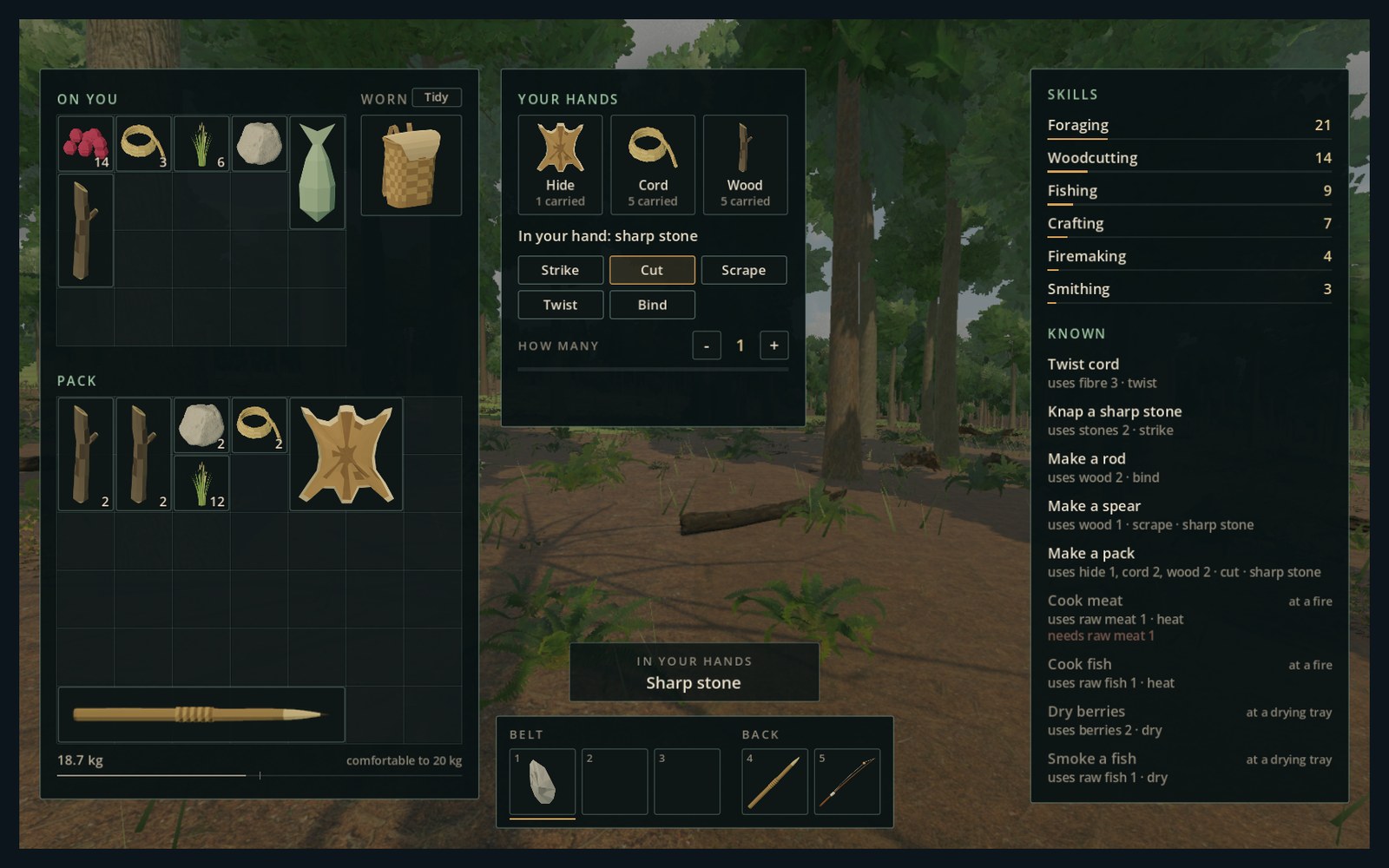
Last time we opened up baskets and the camp store, and said a new way of making things was next. This is its first half.
Press Tab and your pack opens with your hands' work in the middle. Drag what you want to work with onto it, take a tool in your hand, and choose how to work it: strike, cut, scrape, twist, bind. Your traveller does the work, a moment for each try, and "How many" makes several in a row.
Cooking and drying work the same way. Walk up to a fire or a drying tray and press E: the same screen opens at it. Put the meat on to heat, the berries on to dry, and take them off when they're done.
On the right is what you know how to make: what each thing needs and how it's done. What you're short of is marked in red, and what is made somewhere else says so. Click one to set it up.
Everything you could make before, you make here now: cord, the sharp stone, the rod, the spear and the pack, cooked meat and fish, dried berries and smoked fish.
Next is the half this is all for. You won't be handed the list. You'll find out what works by trying it, and what you find you keep.
The picture is taken straight from the game.